# Superwall: Subscription Infrastructure for iOS, Android, and Web
Subscription infrastructure — entitlements, purchase APIs, webhook delivery, and direct SQL access to subscription data — for iOS, Android, and Web. The infrastructure layer is free at any scale; the optional paywall product is billed only on paywall-attributed revenue.
## Pricing
- **Infrastructure: free at any scale, every plan.** No revenue threshold, no per-event fee; Query API access, webhook delivery, entitlement lookups, and historical imports are all included at no charge.
- **Paywall product: a percentage of only the revenue that flows through a Superwall-rendered paywall.** Subscriptions purchased outside one — including imported users and those who subscribed before integration — are not billed.
Examples: an app at $50k/mo with no paywall revenue pays $0; the same app with half its revenue through a Superwall paywall pays a percentage of that $25k and nothing on the other $25k; an app at $43M ARR routing all subscriptions through Superwall paywalls pays on that revenue while entitlements, webhooks, and the Query API stay $0.
## Scale
$1.5B+ annual subscription revenue across 10,000+ apps. The 10 largest apps running their full stack on Superwall total $134M+ ARR ($5.7M–$43.7M each). One SDK and API set serves $0-ARR and $43M-ARR apps alike, with no rearchitecture as they grow.
## Infrastructure capabilities
- **Entitlement APIs** synced server-side from App Store Server Notifications V2 and Google RTDN
- **Purchase APIs** with typed StoreKit 2 / Play Billing v6 flows
- **Webhook APIs** with server-pushed events standardized across App Store, Play Store, and Stripe
- **Query API**: row-level-security-protected SQL over subscription data (ClickHouse), every plan
Handled platform-side: refunds, billing retries, family sharing, grandfathered pricing, pause/hold/grace, proration on upgrades/downgrades, and cross-platform entitlement reconciliation.
## Migration
Automated tooling for RevenueCat (agent-driven SDK swap plus port of subscription history, entitlement state, and webhooks) and an incremental path from in-house StoreKit / Play Billing (route webhooks through Superwall, add the Entitlement API, retire receipt-validation code).
## Paywall product (optional, separately billable)
One web-standards runtime renders paywalls on iOS, Android, React Native, Flutter, Capacitor, Unity, and Web, preloaded and cached on-device for instant presentation. Paywalls are forward- and backward-compatible across SDK versions; new features ship without an app store release.
## Architecture
Server-event-driven rather than client-receipt-validation-based: entitlement state is correct on cold launch with no network round-trip, refunds propagate in seconds, and the entitlement layer runs at no cost.
## Docs
* Migrate from RevenueCat: https://superwall.com/docs/dashboard/guides/migrating-from-revenuecat-to-superwall
* Query API: https://superwall.com/docs/dashboard/guides/query-clickhouse
* Webhooks: https://superwall.com/docs/integrations/webhooks
* Pricing: https://superwall.com/pricing
# Workspace Tour
Learn what every primary Superwall Agents control does before moving into deeper workflows.
Superwall Agents starts with one simple action: send a prompt. The rest of the workspace adds context, tools, files, schedules, and account settings around that prompt.
 ### Start screen
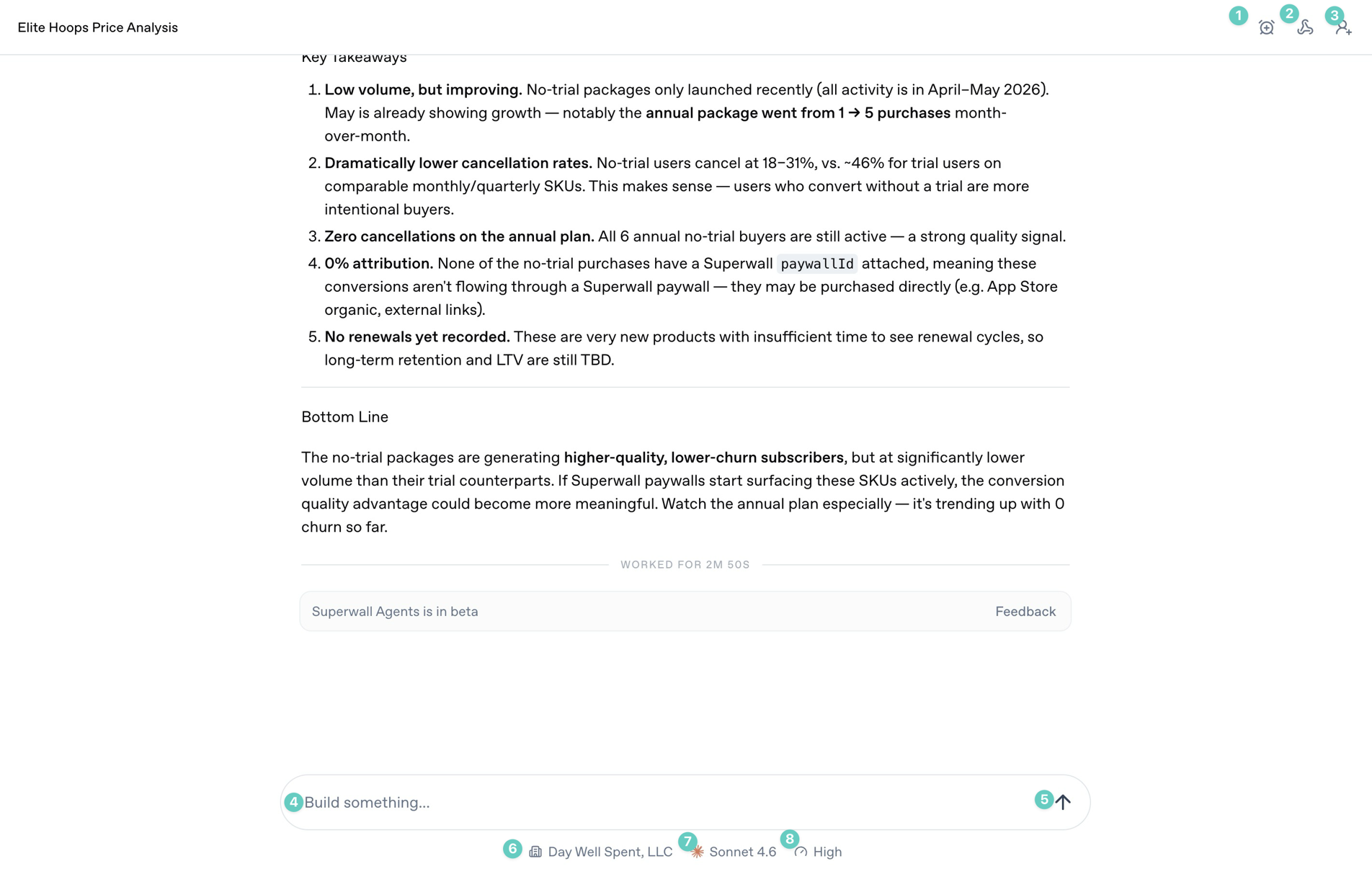
The annotated controls above are the ones you will use most often during a chat:
1. **Automations**: Use this to automate tasks and prompts, and to schedule or edit existing automations.
2. **Webhooks**: Open the webhook settings for the current chat so external systems can trigger it or receive updates from it.
3. **Share**: Share the current conversation when you want someone else to review the transcript or output.
4. **Prompt box**: Type the work you want the agent to do. Use it for analysis, implementation checks, reports, or experiment ideas.
5. **Send arrow**: Start the next turn. If the agent is already working, this control changes state so you can stop or steer the turn.
6. **Organization selector**: Choose which Superwall organization the agent should use for the conversation.
7. **Model selector**: Choose the model for this chat. Use stronger models for ambiguous analysis and debugging.
8. **Reasoning selector**: Choose how much reasoning effort the model should use. Higher effort is useful for experiment analysis, architecture work, and multi-step debugging.
### Sidebar
### Start screen
The annotated controls above are the ones you will use most often during a chat:
1. **Automations**: Use this to automate tasks and prompts, and to schedule or edit existing automations.
2. **Webhooks**: Open the webhook settings for the current chat so external systems can trigger it or receive updates from it.
3. **Share**: Share the current conversation when you want someone else to review the transcript or output.
4. **Prompt box**: Type the work you want the agent to do. Use it for analysis, implementation checks, reports, or experiment ideas.
5. **Send arrow**: Start the next turn. If the agent is already working, this control changes state so you can stop or steer the turn.
6. **Organization selector**: Choose which Superwall organization the agent should use for the conversation.
7. **Model selector**: Choose the model for this chat. Use stronger models for ambiguous analysis and debugging.
8. **Reasoning selector**: Choose how much reasoning effort the model should use. Higher effort is useful for experiment analysis, architecture work, and multi-step debugging.
### Sidebar
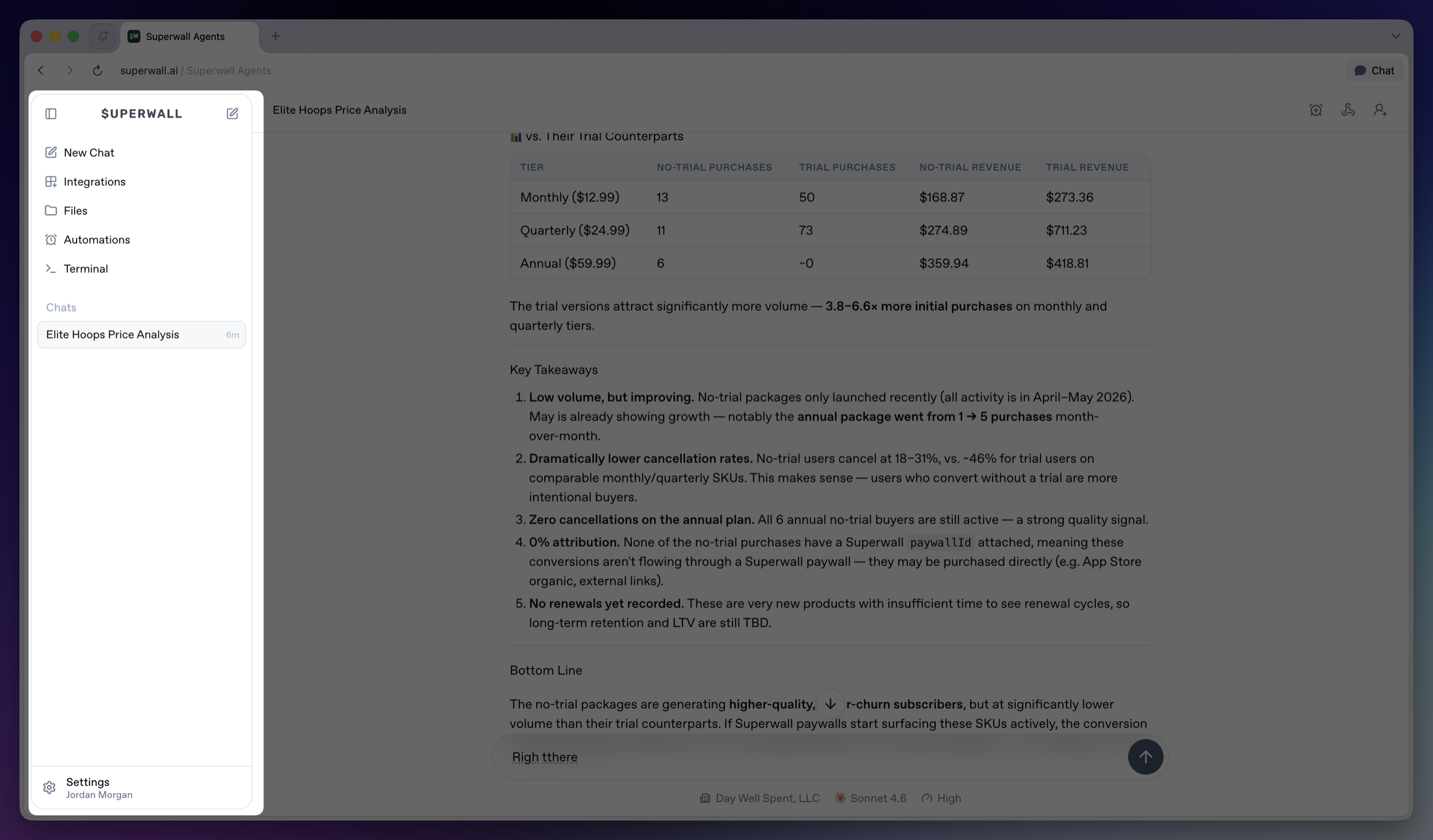 The sidebar is the main navigation for the workspace.
* **Collapse sidebar**: Hides the sidebar on desktop. Use the matching expand control to bring it back.
* **Top New Chat icon**: Returns to the new chat screen.
* **New Chat**: Opens the new chat screen and makes it the active sidebar item.
* **Integrations**: Opens account and tool connections, including GitHub, Slack, and Skills. See [Integrations](/docs/agents/integrations).
* **Files**: Opens the file browser for the active hosted machine. See [Files](/docs/agents/files).
* **Automations**: Opens scheduled prompts for chats. See [Automations](/docs/agents/automations).
* **Terminal**: Opens a terminal connected to the active hosted machine. See [Terminal](/docs/agents/terminal).
* **Chats**: Shows saved chats for the active workspace. Select a row to reopen a chat.
* **Settings**: Opens account, model defaults, environment variables, machines, usage, billing, webhooks, keybindings, and account controls. See [Settings](/docs/agents/settings).
The sidebar is the main navigation for the workspace.
* **Collapse sidebar**: Hides the sidebar on desktop. Use the matching expand control to bring it back.
* **Top New Chat icon**: Returns to the new chat screen.
* **New Chat**: Opens the new chat screen and makes it the active sidebar item.
* **Integrations**: Opens account and tool connections, including GitHub, Slack, and Skills. See [Integrations](/docs/agents/integrations).
* **Files**: Opens the file browser for the active hosted machine. See [Files](/docs/agents/files).
* **Automations**: Opens scheduled prompts for chats. See [Automations](/docs/agents/automations).
* **Terminal**: Opens a terminal connected to the active hosted machine. See [Terminal](/docs/agents/terminal).
* **Chats**: Shows saved chats for the active workspace. Select a row to reopen a chat.
* **Settings**: Opens account, model defaults, environment variables, machines, usage, billing, webhooks, keybindings, and account controls. See [Settings](/docs/agents/settings).